Category: Software Reviews | Read time: 9 min | Published: 7 July 2026
Professional Services Automation software has traditionally been built for large enterprise consultancies with hundreds of staff and implementation budgets measured in tens of thousands of pounds. Small agencies in the UK — boutique creative firms, specialist management consultancies, independent professional services businesses with 5 to 50 people — have been left choosing between enterprise tools they cannot afford and basic time trackers that do not give them enough operational visibility to run a commercially disciplined firm.
What Is PSA Software and What Does It Do?
PSA stands for Professional Services Automation. It manages the operational backbone of a professional services firm: project tracking, time and expense capture, resource planning, client billing, and profitability reporting. Unlike a CRM — which manages client relationships — or an accounting platform like Xero — which handles bookkeeping — PSA sits in the operational middle, connecting what your team delivers day to day to what your business earns.
When PSA software works well, a principal or director can look at one screen and know which projects are on budget and which are at risk, who has capacity next month and who is overloaded, whether the firm is on track to hit its utilisation targets, and which clients are consuming disproportionate time relative to their revenue contribution.
What Small UK Agencies Actually Need From PSA Software
What a small professional services agency genuinely needs:
- Time tracking that people actually use — frictionless enough that team members log time consistently and completely, not reconstructing the week from memory every Friday afternoon.
- Project budgets with real-time burn tracking — a live view of hours consumed versus remaining, visible to both the account lead and the delivery team, without anyone having to run a report.
- Team utilisation visibility — a simple dashboard showing whether each person's time is being converted into billable hours at an acceptable rate, updated daily rather than monthly.
- Client billing summaries — exportable reports that connect to Xero or QuickBooks without requiring manual re-entry of timesheet data.
- Operational within days, not months — if setup requires more than a week, the cost-benefit calculation for a small agency looks very different.
What To Evaluate When Choosing PSA Software for a Small UK Agency
- GBP pricing — a tool priced in US dollars is a variable cost that changes with the exchange rate. Look for GBP pricing with transparent per-seat rates and no hidden costs.
- GDPR compliance and data residency — confirm the vendor has a UK or EEA data processing agreement and can clearly answer questions about data residency.
- Time to value — the answer should be measured in hours or days, not weeks or months.
- Support within UK business hours — a support team operating primarily on US Pacific time is effectively unavailable during a UK working day.
- Pricing model scalability — check how pricing changes as you grow from 12 to 20 to 30 staff to avoid budget surprises.
Common PSA Alternatives and Where They Fall Short
Harvest — strong on time tracking and invoicing integration. Project management and resource planning are minimal, utilisation reporting is shallow, and there is no RAG project status view.
Toggl Track — excellent at time capture but almost entirely a time recorder. No meaningful delivery tracking, no utilisation dashboard, no resource planner.
Clockify — free at its base tier. Reporting is limited, resource planning is absent. A transitional tool rather than a long-term solution for growing firms.
Teamwork — capable project management platform oriented around task completion rather than financial performance. Profitability reporting is relatively shallow.
Float — a strong resource planning and scheduling tool, but not a PSA — it does not handle time tracking, project budgets, or profitability reporting.
The True Cost of the Wrong PSA Choice
The cost of a PSA tool is not only the subscription fee — it includes the time spent on data entry, workarounds, and manual exports to fill gaps the software should fill automatically. If your account manager spends 90 minutes per week exporting timesheet data and reconciling it with a budget spreadsheet, that is roughly 75 hours per year at a senior person's rate. At £85 per hour, that is £6,375 of capacity consumed by a process that the right software should handle automatically.
The less visible cost is the decisions not made — or made incorrectly — because the data was not available. A project that could have been flagged as at risk three weeks earlier. A new project taken on without understanding the delivery team was already at 85% utilisation. These are the costs that make the wrong PSA choice genuinely expensive.
How to Migrate From Spreadsheets to PSA Software
Start with time tracking on new projects. Configure your team to log time in the new system from a defined date rather than attempting to import historical timesheets. Historical data is rarely needed for operational decisions.
Set up billing rates and project budgets for active projects. Add each active project with its current remaining budget and configure the billing rates for team members. This gives an immediate live view of budget consumption going forward.
Train the team in one session. A 30-minute session covering the mobile app, the weekly time submission process, and how to categorise time correctly is typically sufficient for a small team.
Run parallel systems for two weeks. Continue to maintain your existing spreadsheet for two weeks after the new tool goes live, giving you a baseline for comparison before you retire the old process.
Hourglass: PSA Software Built for Small UK Professional Services Firms
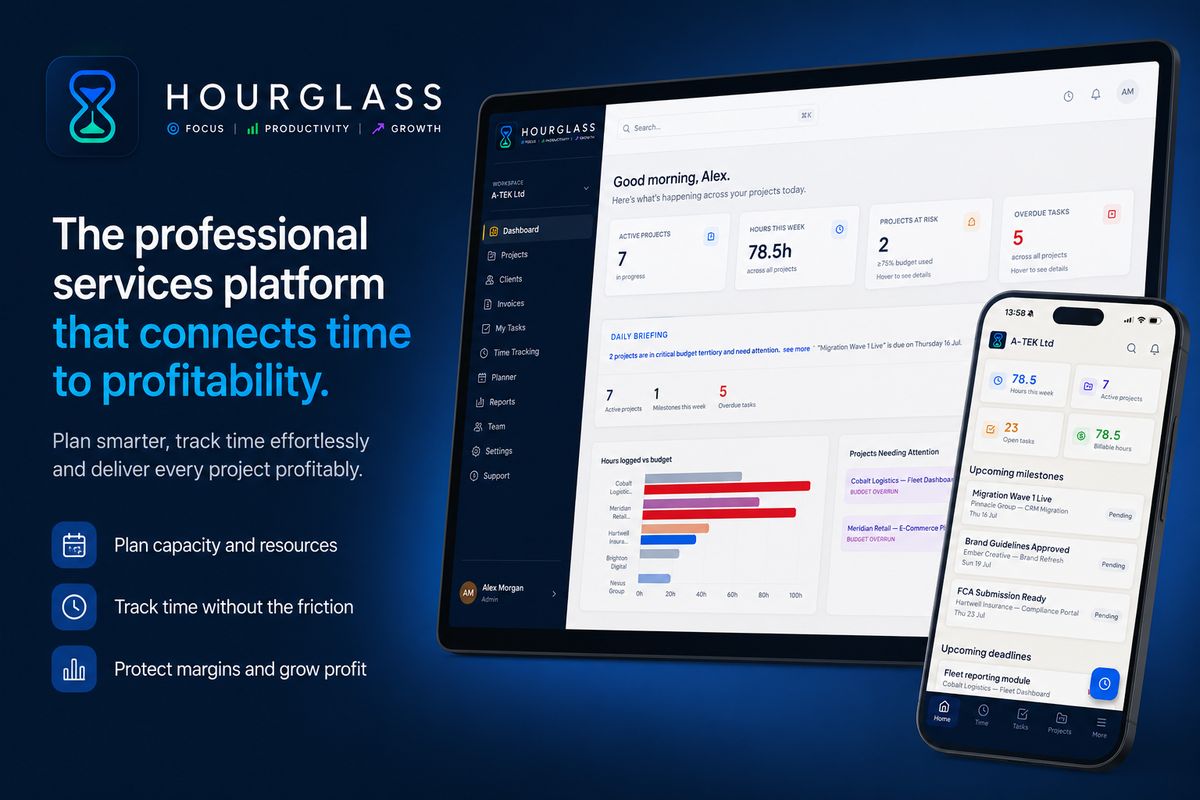
Hourglass was designed specifically for small professional services firms in the UK — agencies, consultancies, and specialist practices with 5 to 100 people who need more than a time tracker but do not want to deploy an enterprise platform. The platform combines time tracking, a drag-and-drop resource planner, project delivery monitoring with RAG budget status, team utilisation dashboards, profitability reporting, and Xero integration — in a single tool with per-seat GBP pricing and no implementation cost. Setup takes hours rather than months.
Frequently Asked Questions
What is the difference between PSA software and project management software?
Project management software (Asana, Monday.com, Teamwork) focuses on task organisation, milestone tracking, and team collaboration. PSA software goes further, connecting project delivery to financial performance: time logging against budgets, utilisation tracking, billing rate management, and profitability reporting. For a professional services firm where time is the product, the financial layer of PSA is as important as the project management layer.
How much does PSA software typically cost for a small agency?
Enterprise platforms can cost upwards of £500–£2,000 per user per year with additional implementation fees. Purpose-built tools for small UK agencies — including Hourglass — typically range from £10 to £30 per user per month, billed in GBP with no additional implementation cost. For a 15-person agency, this means £1,800 to £5,400 annually.
Do I need PSA software if I use Xero for my accounting?
Xero is an accounting platform — it handles invoicing and bookkeeping, but is not designed to track time against project budgets, monitor team utilisation, or manage resource allocation. PSA software complements Xero rather than replacing it: the PSA tracks operational performance, and Xero handles financial accounting. Most PSA tools integrate with Xero so billing data flows between systems without manual re-entry.
Hourglass is a professional services delivery platform built for UK agencies and consultancies. Start your free trial at hourglass.syncrasoft.com — no credit card required.